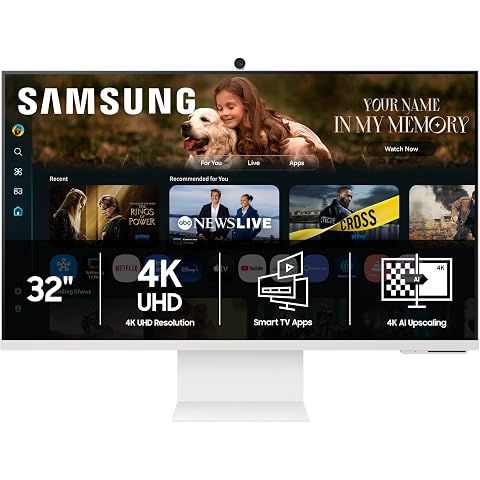
TLDR Review: Samsung Smart Monitor M8 32” 2025
Verdict
The SAMSUNG 32” Smart Monitor M8 (M80F) strikes a solid balance between a 4K UHD PC monitor and a smart TV with excellent image quality and versatile connectivity. It’s a fantastic choice if you want a compact, multipurpose display for streaming, gaming, and productivity—but be prepared to wrestle with a somewhat fiddly setup and limited HDMI inputs. If you want simpler plug-and-play smart TV capabilities or need more HDMI ports, consider checking out other smart monitors or TVs tailored specifically for those needs. Overall, it’s a stylish, high-value pick for those who like a little extra tech under one sleek package.
- Top pro:
- Delivers stunning 4K UHD picture quality with exceptionally sharp images due to high pixel density on a compact 32” screen.
- Top con:
- Initial setup and smart feature configuration can be unnecessarily complicated and frustrating for some users.
Pros
- •Delivers stunning 4K UHD picture quality with exceptionally sharp images due to high pixel density on a compact 32” screen.
- •Functions seamlessly as both a smart TV and a PC monitor, making it highly versatile for home office, streaming, and gaming setups.
- •Includes Samsung Vision AI and Smart TV apps, enabling direct access to popular streaming services without needing a separate device.
- •Gaming Hub support provides fluid performance for consoles like Nintendo Switch 2.
- •Remote control is compact and user-friendly, with quick access to media controls and streaming apps.
- •Offers multiple connectivity options including USB-C, HDMI, and USB-A ports, allowing easy connection to laptops, gaming devices, and flash drives.
- •Built-in speakers provide adequate sound for casual or ambient listening, removing the immediate need for external speakers.
- •Well-constructed and durable design in a sleek white finish that fits nicely in modern workspaces or living rooms.
- •Easy to set up with clear packaging and instructions.
- •Works well independently of a PC for playing videos from USB drives, adding ambiance without extra gear.
Cons
- •Initial setup and smart feature configuration can be unnecessarily complicated and frustrating for some users.
- •Limited to a single HDMI input, which may require an external HDMI switch for users with several devices.
- •Some older PC applications do not support HiDPI properly, causing text to appear very small and hard to read.
- •Initial PC input mode may automatically log users into a Samsung account, causing unwanted system behavior.
- •Built-in webcam may flicker or perform unreliably in certain lighting conditions.
- •Sound quality from built-in speakers is acceptable but not outstanding, possibly necessitating external audio for better experience.
- •High sensitivity to input types can cause occasional recognition errors before adjusting settings.
- •Color calibration may pose difficulties, especially for Mac users seeking highly accurate profiles.
We may earn a commission when you buy through these links, at no extra cost to you. How ShopSavvy makes money
How we researched this
About this review: it summarizes the professional reviews and customer ratings ShopSavvy collected for this product, alongside prices from ShopSavvy's price data.
 Download ShopSavvy App
Compare prices across tens of thousands of stores, set price alerts, watch for deals by keyword, and much more.
 Install ShopSavvy Browser Extension
Compare and track prices automatically while you shop online at thousands of websites.




